Hand the work to your AI staff.
You decide before anything goes out.
Ask in chat, and AI staff — COO, CFO, CMO and CS — plan the work and carry it out across the services you've connected. Anything that leaves your company, like sending an email or posting to social media, runs only after you approve it in the Inbox.
7 days free. From ¥4,378/month (tax incl.). Going over your allowance never adds charges on its own.
You add a card when you start, and the plan you chose renews automatically after 7 days. Cancel during the trial and you won't be charged.

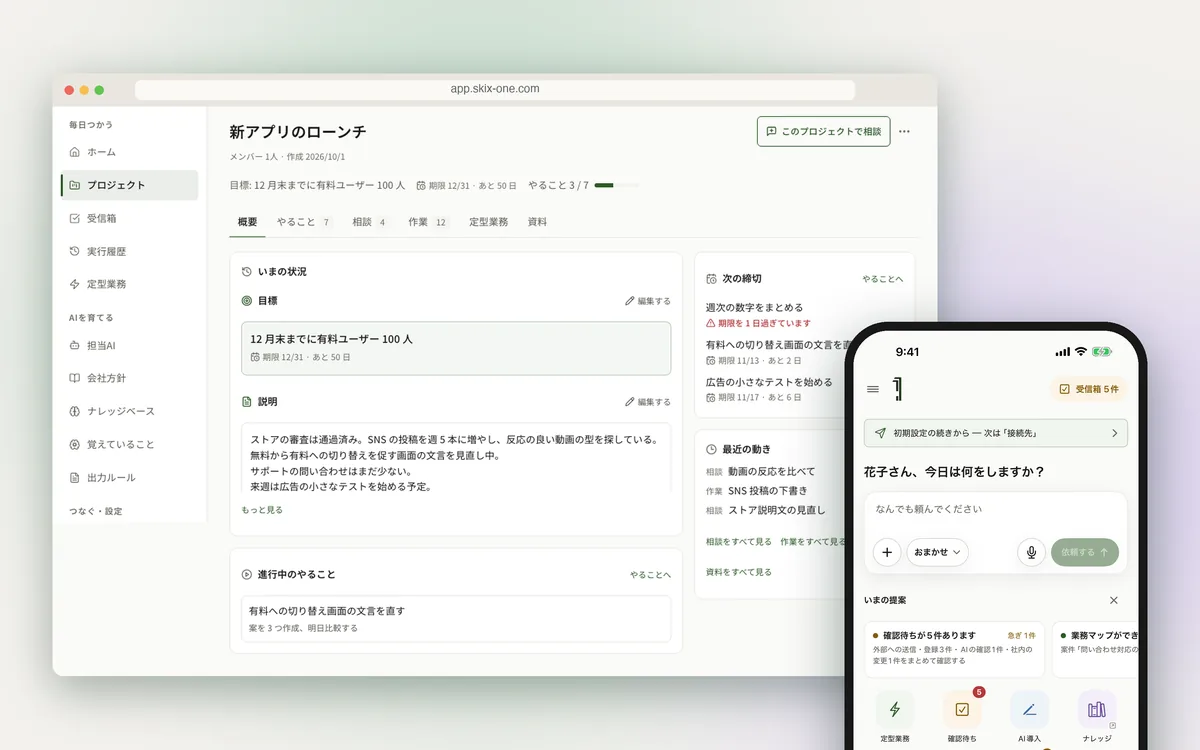
Talk, and the work moves forward.
Not an AI that only answers — an AI that gets work done, with the safeguards you need to trust it from day one.
AI staff, each with a role
COO, CFO, CMO and CS each take on their own work. Not sure who to ask? Just ask — your request goes to the right one.
Your approval before anything goes out
Sending email, posting to social media, changing ads — every outbound action lands in your Inbox for review. Approve it, decline it, or ask for changes.
It learns how your company works
Company policies, your Knowledge Base and what Skix remembers from conversations are checked every time. Corrections stick, so the next result fits you better.
Works with the tools you already use
Gmail, Slack, Google Drive, social networks, Google Ads, Meta Ads and more. Connect what you have — no need to switch.
Turn repeat work into Templates
Daily, weekly and monthly tasks run on schedule as Templates. Start from a ready-made one.
See exactly what was done
Each job's progress, results and steps are kept in Run history. Data is kept separate for every company.
From request to done.
No complex setup. Just ask in your own words.
Ask
Tell it what you need — from the web, the iPhone app, Slack, LINE or Telegram.
AI staff make a plan
Using your company policies and knowledge, they work out what to do and in what order.
Work runs across your services
Research, drafts, reports, getting posts ready — across several services. When needed, the AI operates a browser on its own work screen.
You approve what goes out
Before anything is sent, posted or registered, you're notified in the Inbox and by push notification — decide right from your phone.
Results and a record
Results and every step stay in Run history, so you can check who did what, and why.
Set it once, then let it run.
No need to ask every time. As a Template, the work runs on schedule and the results arrive in your Inbox.
A full team of AI staff for your company.
You start with four AI staff. Each request goes to the one whose role fits.
Front desk and follow-through
Takes your requests and routes them. Keeps projects moving toward their goals and deadlines.
Marketing and reach
Drafts social posts and produces the monthly SEO & AI search report and the morning ad performance report.
Customer inquiries
Drafts replies to customer inquiries based on your company knowledge. Nothing is sent until you approve.
Numbers, summarized
Pulls together sales and cost figures into a monthly report.
Four kinds of work to hand off first.
Pick a ready-made Template and start today.
Social media
Drafts posts for X, Facebook, Instagram, LinkedIn and note from your products and news. Posted only after you approve.
Ad & SEO reports
Connects to Google Ads, Meta Ads and Search Console for a morning ad performance report and a monthly SEO & AI search report.
Sales prep
Builds a prospect list and drafts outreach emails every week. Sent only after you approve.
Replies to inquiries
Drafts replies grounded in your company knowledge and puts them in your Inbox for review.
It learns the way your company does things.
Rules and phrasing a general-purpose AI can't know. Skix One checks them on every job.
Company policies
Write down the rules to follow — "reply to customers within 24 hours", "check with the president above ¥100,000".
Knowledge Base
Add your documents, and the relevant parts are looked up and used on every job.
What Skix remembers
Facts and preferences picked up in conversation are remembered. See the full list and make it forget anything.
Output rules
Social posts and reports come out in the format of your own samples.
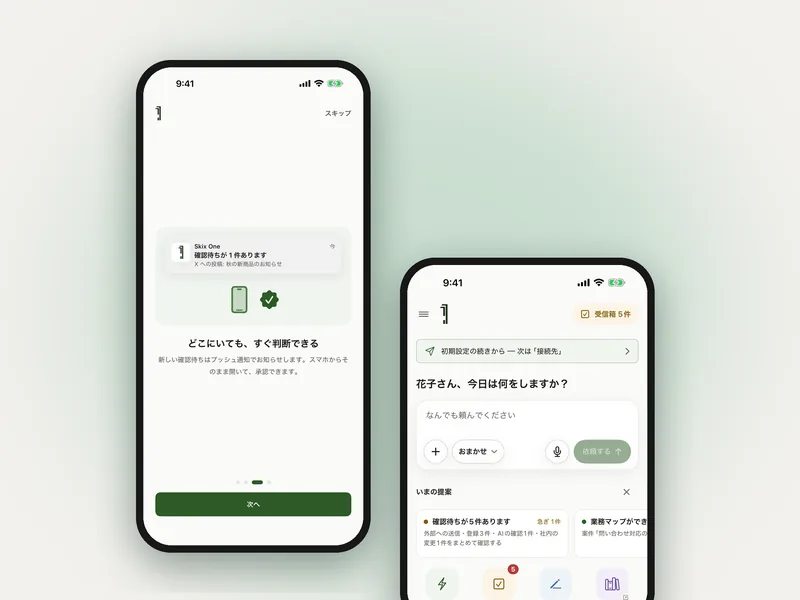
Approve and ask from your phone.
Catch items awaiting review on the go, and decide on the spot.
- Requests: ask in chat and follow progress and results
- Awaiting review: get a push notification, then approve, decline or ask for changes
- Templates and projects: see what's running and what's due next
Knowledge and connected services are set up in the web version.
Requires iOS 17.0 or laterConnects to the tools you already use.
Connect the services you have, and your AI staff work across them.
We keep adding services. If there's one you need, let us know.
Pay for what you use, clearly.
From ¥4,378/month (tax incl.). Try it free for 7 days.
7-day free trial
Use 1M Standard Tokens free for 7 days. After 7 days the plan you chose renews automatically (cancel during the trial and you won't be charged).
Work stops at your allowance
We never bill you for usage beyond your allowance. You buy add-on packs yourself, and you decide whether to change plans.
Personal
Individuals, side projects, freelancers
tax incl./¥3,980 excl. tax
- 4M Standard Tokens / month
- About 17〜25 Sonnet requests
Solo
Solo founders, small offices
tax incl./¥14,800 excl. tax
- 15M Standard Tokens / month
- About 60〜95 Sonnet requests
Team
Companies of 5–30 people
tax incl./¥49,800 excl. tax
- 50M Standard Tokens / month
- About 210〜310 Sonnet requests
Business
Companies of 30–150 people
tax incl./¥98,000 excl. tax
- 100M Standard Tokens / month
- About 420〜620 Sonnet requests
Enterprise
150+ people, specific requirements
- Standard Tokens quoted individually
- Bring your own API key (BYO) supported
- Unlimited users and AI roles
Hand your repeat work to AI staff.
Start with 7 days free — on the web or in the iPhone app.
You add a card when you start, and the plan you chose renews automatically after 7 days. Cancel during the trial and you won't be charged.
Questions? Contact usFrequently asked questions
- What does Skix One do?
- It's an AI work assistant for small businesses. Ask in chat, and AI staff (COO, CFO, CMO, CS) plan the work and carry it out across your connected services — Gmail, Slack, Google Drive, social networks, ads and more.
- Will the AI send emails or post on its own?
- No. Sending email, posting to social media, changing ads and creating records in outside services all run only after a person approves them in the Inbox. Every step stays in Run history.
- Which services does it connect to?
- Gmail, Google Drive, Google Docs, Slack, LINE, Telegram, X, Facebook, Instagram, LinkedIn, note, Google Search Console, Google Ads, Meta Ads, GitHub, freee Accounting and more.
- What Templates are included?
- Social posts (note, X, Facebook, LinkedIn, Instagram), a monthly SEO & AI search report, a morning ad performance report, prospect list building and outreach email drafts.
- Can I use it on my phone?
- Yes. The iPhone and iPad app is on the App Store (iOS 17.0 or later). Ask, approve items awaiting review, and check Templates and projects. Knowledge and connected services are set up in the web version.
- Can I ask from Slack or LINE?
- Yes. You can talk to it from Slack, LINE and Telegram. In group chats, it replies when you @mention it.
- Is each company's data kept separate?
- Yes. Data is kept separately for each company (tenant), and actions are recorded.
- Which languages are supported?
- Japanese, English, Chinese and Korean — on the web and in the app.
“Usable without a manual. Fixable by you when it's wrong. And it remembers the fix. Only when all three come together does AI become something your team can truly trust.”